Parenting record app: what should you record and how do you use it? Summary of Babyfolio's feeding, sleep, and diaper tracking features
If you're wondering what a baby tracking app can do for you: From feeding, sleep, and diaper logs to AI voice recording, weekly stats, and family sharing—we've summarized all the core features of Babyfolio in one place.
When raising a newborn, those moments of "Wait, when did I last feed them?" or "How many naps did they take today?" happen several times a day. Even after just a few days, memories start to overlap, and that’s where a parenting log app comes in to clear the confusion.
Parenting log apps allow you to easily record your baby’s daily rhythm—such as feeding, sleeping, and diaper changes—and organize them so you can see patterns at a glance. Babyfolio keeps this logging feature at its core. We’ve put together a guide for beginners on what exactly you can record and how to get started.
What changes when you keep a parenting log?
While logging might feel like an extra chore, it makes several things much easier after just a few days.
First, your baby’s rhythm becomes visible. When you see patterns in when they get hungry or sleepy, you can guess the reason they’re crying a bit faster. Since every baby is different, it won't always be a perfect match, but it’s much smoother than relying on intuition alone.
It’s also incredibly useful during doctor consultations. During vaccinations or check-ups, you’ll be asked questions like "Are they eating well?" or "How much do they sleep?" Instead of guessing, showing actual records makes the consultation much more accurate.
Another benefit is that records can be kept alongside photos. It’s fun to look back later and see, "Oh, they ate and slept like this back then," turning a management tool into a precious growth diary.
What can I record in Babyfolio?
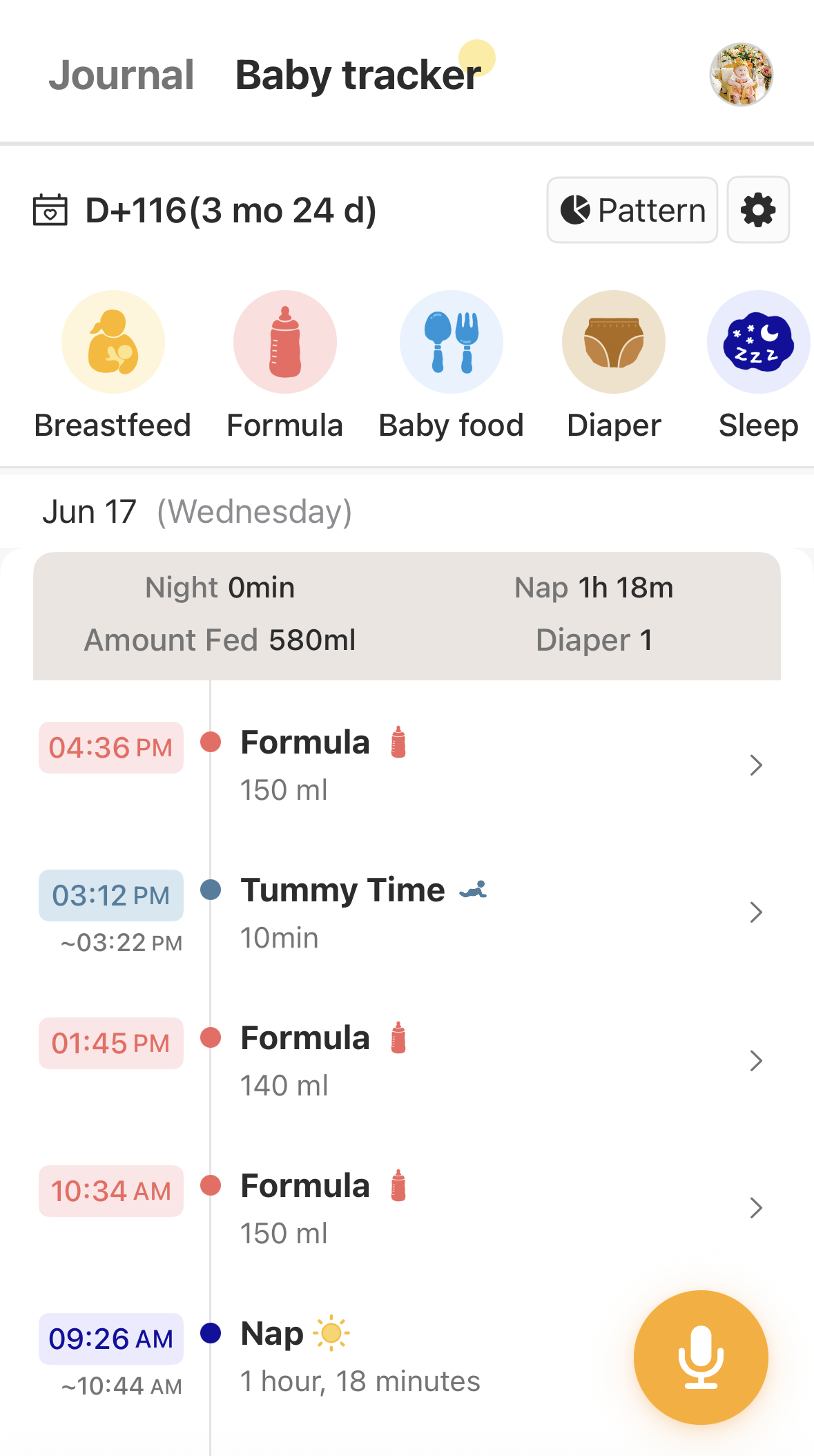
While "feeding log" usually brings to mind just breast milk or formula, you can actually record almost every aspect of daily childcare.
Category | Logging Items |
|---|---|
Feeding | Breastfeeding, Formula, Solid food, Pumping, Pumping feeding, Snacks |
Diaper & Sleep | Diaper changes, Sleep |
Health | Hospital, Temperature, Medication, Bath |
Activity & Misc. | Tummy time, Play, Memo |
Even if it seems like a lot, you don’t have to use everything. You can choose which items to display on your screen through the settings button at the end of the list, making it much cleaner and tailored to your parenting style.
Feeding logs are available to all members regardless of free or paid status. To start, navigate to the Growth Records → Feeding Interval tab at the bottom of the app.
Can I record while holding the baby? (AI Voice Log)
It’s difficult to type when you’re holding a baby or busy pumping. That’s why we created the AI Voice Log.
The most convenient part is that you can speak naturally. There’s no need to memorize specific commands; just talk as you normally would. Tap the microphone icon at the top of the Feeding Interval screen and say something like, "They woke up 30 minutes ago, had 60ml of formula at 8:00 AM, and just had a bowel movement." Even if the sentence isn't perfect, the AI understands the core message and organizes it by category.
Items like breastfeeding, formula, solid food, diaper changes, sleep, and pumping feeding can be recognized by voice. Rather than using Bixby or Google Assistant, it uses the app's internal voice feature. This is available on iPhone v5.652 or higher and Android 0.5.2(878) or higher. If it’s not working well, please try updating the app to the latest version first.
Can I transfer my existing records?
If you've already been keeping records in another app or on a paper log from the postpartum care center, you don't have to start over from scratch.
If you were using another feeding log app like BabyTime, you can bring those records over. You can apply via My Page → Account Management → Feeding Settings → Import records from another app.
For paper logs received from care centers, simply send us a photo and we will input it for you. You can apply via My Page → Account Management → Feeding Settings → Auto-input paper feeding records.
In both cases, records will appear in the Growth Records tab within 5 days of your request. The files or photos you send are used only for the purpose of transferring records and will be safely destroyed once complete.
Can I see a summary of my records? (Weekly Statistics)
Records kept daily can be viewed on a weekly basis. By tapping the 'Statistics Pattern' button at the top right of the Diary/Feeding screen, feeding, diaper, and sleep patterns are organized by day and week.
In the weekly view, you can also download your statistics as an Excel file, making it convenient to bring as reference material for check-ups.
Can I log together with my family?
If you record alone, it’s easy to miss feedings or naps that happen while you’re away. In Babyfolio, your spouse or family members can enter and view logs together.
Simply select a family member in My Page → Family/Baby Management and turn on the permissions for viewing/inputting developmental records. This way, the amount of formula fed by a husband or late-night feedings are all collected in one place, allowing the whole family to share the parenting journey while looking at the same records.
If you cannot see the Feeding Interval screen at all, please check My Page → Family/Baby Management → Select Name to see if the view/input permissions are turned on.
Things to keep in mind
A few things to remember while using the logging feature: if your baby’s feeding or sleep patterns change drastically, or if you notice concerning signs like fever, repeated vomiting, bloody stools, suspected dehydration, or breathing problems, please consult a pediatrician rather than relying solely on the logs. Records are simply a tool to provide accurate information during a consultation, not a substitute for a diagnosis.
Frequently Asked Questions
Q. I can't see the Feeding Interval screen. Please check your permission settings. Go to My Page → Family/Baby Management → Select Name and turn on the feeding permission if it is off.
Q. Can my husband also enter feeding records? Yes, it’s possible. Select a family member in My Page → Feeding Settings → Manage feeding intervals with family, and turn on the view/write permissions to record and view together.
Q. Can I enter records for past dates? Currently, you can only enter records within the last 2 days. Entering older dates is a feature planned for improvement.
Q. Voice recognition isn't working well. Please update the app to the latest version and try again. If the issue persists, contact our customer center.
Q. Can I record symptoms like vomiting? You can use the Memo item. However, we do not currently support a separate category for specific symptoms like vomiting.
In Summary
A parenting log app is a tool that remembers your baby’s rhythm of eating, sleeping, and pooping for you. Babyfolio allows you to record a wide range of daily activities from breastfeeding and formula to sleep, diapers, and temperature. With natural language voice logging, record importing, weekly statistics, and family sharing, it’s designed to be used effortlessly even during those busy early days of parenting. Just a few days of logging will help you see your baby’s patterns, so why not start lightly with today’s first feeding?