Service
Q. How long will my Babyfolio videos be stored?
Babyfolio videos are automatically deleted from your temporary storage 15 days after creation.
Please save your videos as soon as they're created 😊
Q. I applied for a Babyfolio Milestone Video, but I haven't received a completion notification yet.
Video creation can take up to one day.
If it's still not complete after 24 hours, please contact Customer Support and we'll quickly look into it and request a remake for you.
Q. Can I download all the photos at once?
You can currently download individual photos and videos for free.
Bulk downloading is available after charging Cheese via My Page → Download All!
Q. I can't find photos I received through KakaoTalk
Photos received in standard or low quality on KakaoTalk are saved by the download date, so they may not appear if you search by the date they were taken.
On the other hand, photos received in original quality are saved by their actual capture date, so they may not appear in your recent photos.
Q. The upload button has suddenly disappeared
If the upload button isn't visible, please go to My Page → Family Permissions and check if "Upload Permission" is turned on!
Q. I can't see the photos I uploaded. I can see them on my end, but they aren't visible to others, and when I try to re-upload them, it says they have already been uploaded.
Please select the date when the photos aren't visible to your family members and check the sharing range setting.
If it's set to "Couple Sharing," other family members won't be able to see them.
Q. How many photos can I upload at once?
With the free version, you can upload up to 100 photos at a time.
With a subscription plan (Family, Premium, etc.), you can upload up to 500 photos at once.
Q. What is the maximum length of a video I can upload?
With the free version and Ad-Free subscription, you can upload videos up to 1 minute.
With higher plans like Family and Goods subscriptions, you can upload videos up to 10 minutes.
With the Family High-Definition+ subscription, you can also upload high-quality FHD (1080*1920) videos!
Q. I uploaded a video, but it's showing up as a black screen.
Please try the following steps in order: ① Force close the app and restart → ② Update to the latest version → ③ Delete the video and re-upload it If the issue persists after updating, please contact Customer Support and we'll look into it for you.
Q. Uploads are not working in the background.
Background uploading is supported, but due to Apple's policies, long-term background uploads are restricted, so only a small number of photos can be uploaded over a short period.
Please understand that this is a system limitation beyond Babyfolio's control.
Q. Where can I watch my free growth videos again on Babyfolio?
You can find it by going to the Create tab at the bottom > Storage at the top > Babyfolio Videos.
Q. How do I create a Babyfolio Video?
Simply select your preferred video type in the Create tab, and a video will be automatically generated using your uploaded cover photos.
Monthly Growth and Birth videos can be created for free by watching an ad.
Specialized videos like 100 Days, 1 Year, Birthday Party, and Premium videos are available exclusively for Babyfolio subscribers (Premium and Family plans).
Q. Location tags are added automatically. How can I delete them?
You can adjust this setting by going to 'My Page > Service Settings > Location Tag on Upload'.
Q. Are photos uploaded in their original quality? I'm wondering if the resolution changes when uploading or downloading.
Whether free or paid, videos uploaded to Babyfolio are compressed to standard quality.
The final result may vary depending on the original video's size and file volume.
While we strive to preserve metadata as much as possible, resolution and bitrate are lowered during the upload process.
If the user who uploaded the video has the original file still saved on their device without any edits, Babyfolio will display the original file to help save on data usage.
Photos are stored in standard quality, which is perfectly suitable for creating photo books, prints, calendars, and more!
Since Babyfolio provides unlimited storage capacity, please understand that we are unable to store original high-resolution files.
Q. Can I delete the uploaded photos all at once?
Yes, you can organize them by date all at once.
After selecting the date you want to delete from the calendar, tap the ⋯ button in the top right corner.
Tap Select Photos to delete all photos from that specific date at once.
Q. Can my family not see the Live Photos?
Live Photos and GIFs will be uploaded using only the first frame image.
The original file may appear to display correctly on the uploader's own phone due to the saved cache.
Q. Can the family members not see the GIFs?
For Live Photos and GIFs, only the first frame image will be uploaded.
The original file may appear normal on the uploader's own phone due to cached data.
Q. How will advertisements be displayed once there are over 1,000 photos?
Once your total uploads exceed 1,000 photos, an advertisement will be shown once a day when you upload photos.
For other family members (those who only view photos), banner ads will be displayed while viewing, regardless of the number of uploads.
If you'd like to enjoy Babyfolio without ads, please check out our Ad-Free or Family subscription plans 😊
Q. What happens to my photos if the Babyfolio service ends?
Your precious memories are safely stored with double backups.
While we have no plans to end our service, we will provide ample opportunity to download your files in the unlikely event of any changes.
Q. Original photos were lost during the backup or transfer process
We sincerely apologize for any inconvenience.
Photos uploaded to Babyfolio are safely stored on our servers and can be viewed within the app.
Please contact us through the [Inquiry] section so we can assist you with restoring your original photos.🙏
Q. Is there a way to make the photos appear in the order they were taken? Even though I took them in the order of 1, 2, 3, they are showing up as 3, 2, 1.
Currently, Babyfolio automatically sorts photos by date taken, with the newest first.
We're discussing a feature to change the order, but we can't provide a specific timeline yet—thank you for your understanding.
Q. The dates on photos I received through KakaoTalk are wrong
When you receive photos through KakaoTalk, the saved date depends on how they were sent.
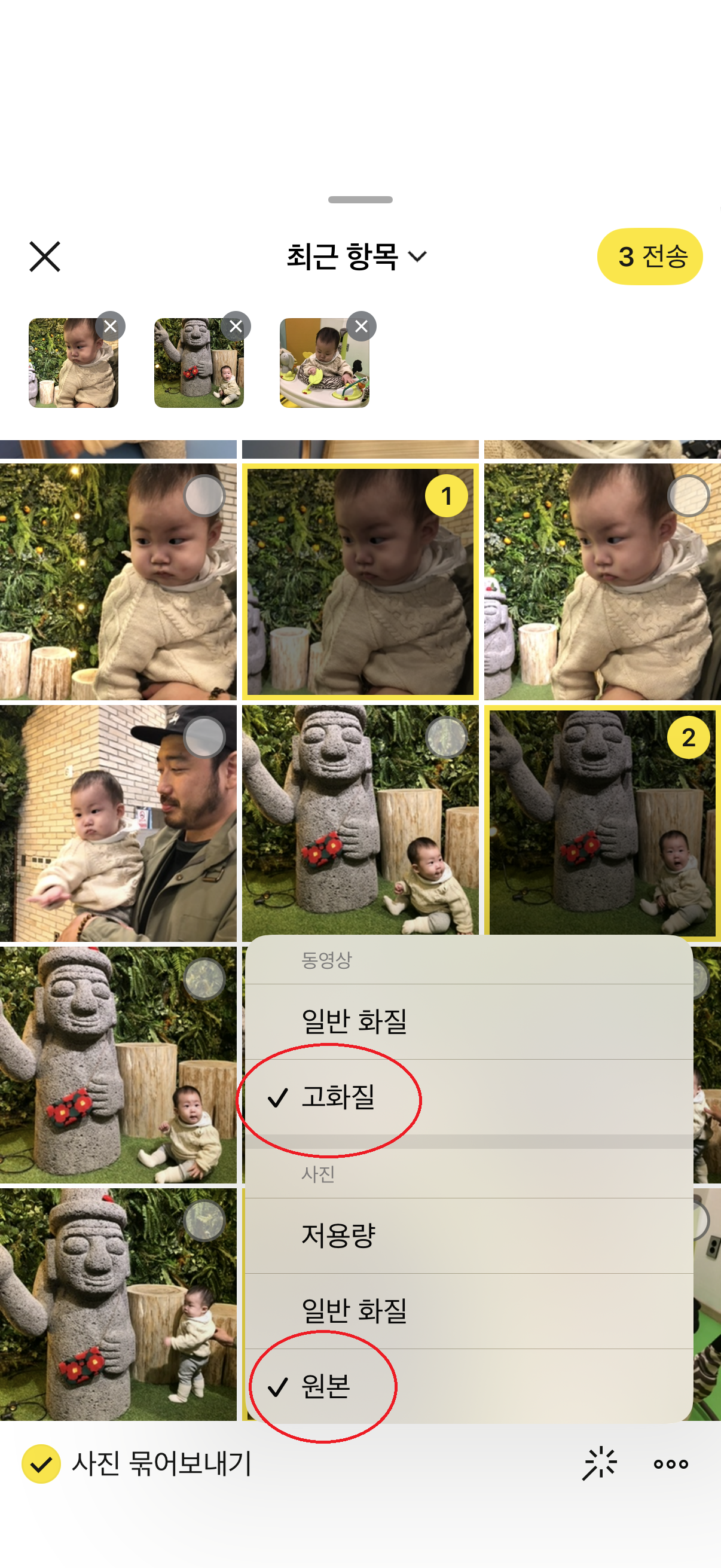
Sent as original → Saved with the date the photo was taken.
Sent as normal/low quality → Saved with the date downloaded from KakaoTalk.
For example, if you received a photo taken in 2023 in normal quality and saved it today, Babyfolio may classify it as today's photo.
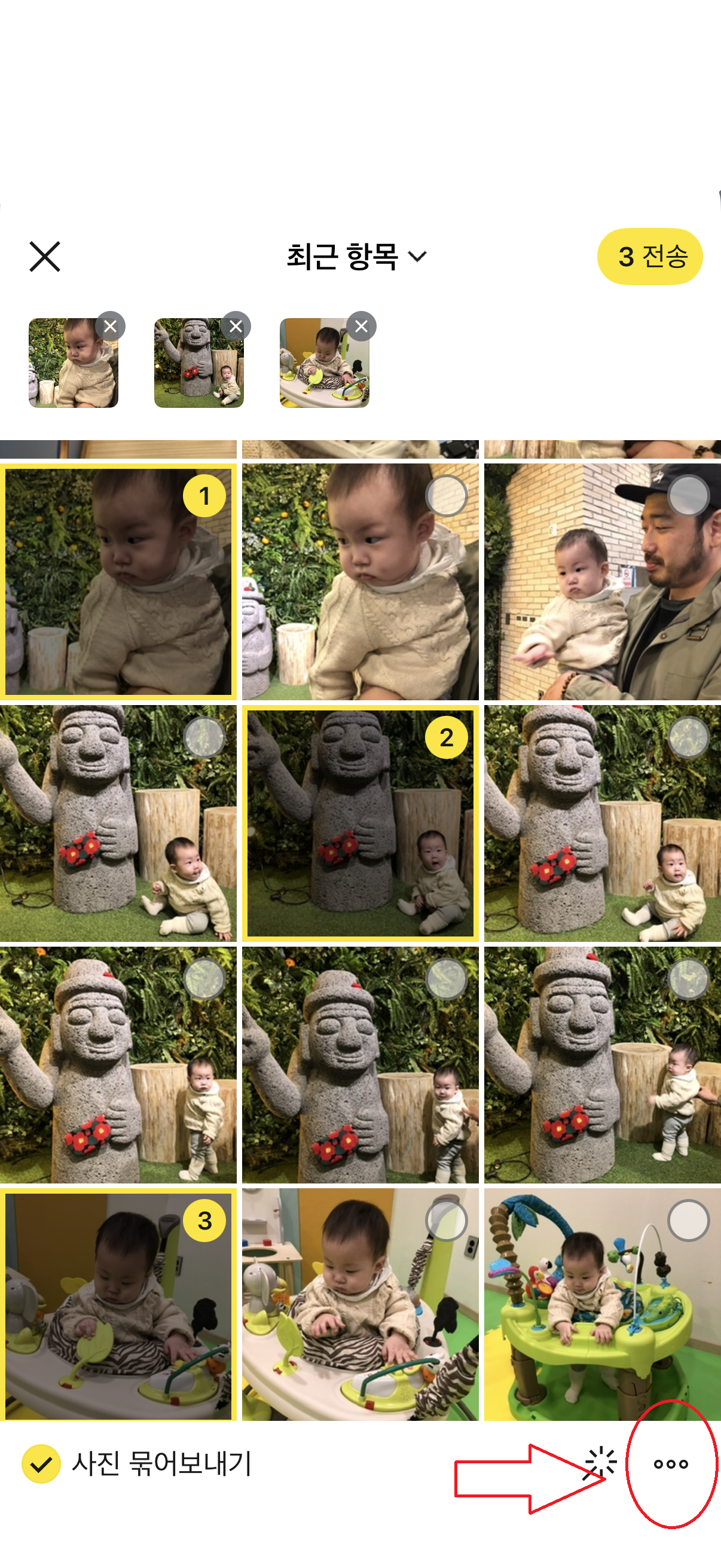
Solution Ask the sender to resend the photo using … → Original when sending through KakaoTalk.
After receiving the original, upload it again and it will be saved with the correct date taken.
Q. If I change the sharing settings after uploading, will my family receive another notification?
No, changing the sharing scope after uploading will not send another notification to your family.
Q. Can I save all the uploaded photos at once?
Yes, you can save them all at once.
Go to My Page > Photo Management > Download All and select the child you would like to download photos for.
Q. Can I edit or delete my comments?
Comments cannot be edited.
However, you can delete any comments you have written yourself.
Admin accounts have the authority to delete all comments, including those left by other family members.
Q. I can't find photos for a specific date. How can I check them?
Some image files may not contain date information, such as when they were taken.
In these cases, photos might not appear under the expected date right away.
When adding photos in Babyfolio, tapping the + button may show photos with date information first.
If you select a specific date from the calendar, photos from that date will appear first, followed by the rest in chronological order.
If you can't find the photo you're looking for, please try selecting the date on the calendar once more.
Q. Can I change the privacy settings for multiple photos at once?
Yes, you can change them all at once.
Go to My Page > Manage Photos > Bulk Change Sharing Settings to update the visibility of multiple photos at the same time.
Q. Photos I uploaded from KakaoTalk have the wrong dates.
Photos downloaded from KakaoTalk or cloud storage are saved with the download date rather than the original photo date.
To save them on the correct date, please select the desired date from the calendar on the home screen before uploading.
Q. I'm having trouble uploading photos and videos.
Please try the following steps in order: ① Close the app completely and restart → ② Update to the latest version → ③ Try on both Wi-Fi and mobile data (LTE/5G) If the problem persists, please send a screen recording or screenshot of the error to Customer Support, and we'll look into it for you!
Q. If I delete photos from my phone after uploading them to the app, will they also disappear from Babyfolio?
No, photos uploaded to Babyfolio will remain in the app even if you delete them from your phone.
However, if you have enabled automatic gallery synchronization, any synchronized edits or changes may be reflected.
Q. After uploading photos to Babyfolio, I noticed that edits made in the iPhone gallery are reflected in the app in real time. Is there a way to turn this off if I don't want them linked?
This happens because we first show photos from your phone's gallery to display images and videos quickly while reducing data usage.
Any edits made in your gallery will only be visible on your phone, while other family members will see the original version uploaded to the Babyfolio server.
Q. Can I upload photos from my PC to Babyfolio?
We're well aware of the many requests for PC upload and a PC version, and we fully recognize the need for these features.
However, because PC upload and a web version require a different structural development process compared to the app, we can't provide a specific timeline at this time—thank you for your understanding.
Q. How can I download photos and videos?
You can only download files if the administrator has granted download permission to family members.
If you have permission, open the photo or video and tap the download button in the top right corner.
If you're unable to download, please ask the administrator to check your permission settings.
Q. Does uploading photos reduce the storage space on my phone? Also, how much free space do I need to have available to upload them?
Uploading to Babyfolio does not reduce your phone's storage space.
However, since files are saved in "Standard Quality," we recommend backing up your original high-resolution photos elsewhere.
While Babyfolio offers unlimited upload storage, the app saves cache data during the upload process, similar to KakaoTalk.
* If the app is taking up too much space, you can clear it by going to "My Page > Service Settings > Clear Cache."
Q. Can I upload videos with the sound muted?
Yes, you can!
After selecting the video you want to upload, tap Edit Video to mute the sound before uploading.
However, the mute editing feature is a premium benefit for Babyfolio subscribers and is only available for accounts with an active subscription.
Q. I selected a date and uploaded them, but photos and videos from different dates are being uploaded together.
When a photo or video has a filename in a date format (e.g., 20260701), Babyfolio prioritizes the date in the filename over the shooting date metadata.
This often happens with photos downloaded from apps like Instagram, KakaoTalk, or Kids Note, where the filename may not match the actual date the photo was taken.
For example, if a photo was actually taken on July 2nd but the filename is saved as 20260701, it will be recognized as a July 1st photo and uploaded along with others from that date if you select July 1st for upload.
How to Fix This
Before uploading downloaded photos or videos, please check if the filename contains a date.
If the date in the filename differs from the actual shooting date, please rename the file to match the correct date before uploading.
Alternatively, you can manually select the specific date you want when uploading.
Q. The upload is not working.
Please search for "Babyfolio" in the app store, update to the latest version, and try again.
If the issue persists after updating, please check the following: 1.
Does the upload fail on all connections (Wi-Fi, LTE, 5G)?
2.
Does the issue continue even after reinstalling the app?
If it still doesn't work, please go to Customer Support > Contact Us and send us a screenshot or screen recording of the error so we can look into it.
Q. I noticed the photo quality decreased after downloading. Is there a way to keep the original high quality?
Babyfolio compresses videos to standard quality during upload, regardless of whether you're using a free or paid plan.
The specific quality may vary depending on the original size and volume of the file.
We strive to preserve metadata as much as possible, but videos are uploaded with adjusted resolution and bitrate.
Q. How do I set up push notifications for Babyfolio?
You can manage Babyfolio push notifications through both the app settings and your phone's system settings 😊
First, please check if all notification settings within the Babyfolio app are toggled OFF.
If you are still receiving push notifications after turning them off in the app, please check your phone's system notification permissions as well 📱
iPhone (iOS): Settings → Babyfolio → Notifications → Allow Notifications OFF
Android: Settings → Apps → Babyfolio → Notifications → OFF
Since the app's notification settings and your phone's system permissions are applied separately, we recommend checking both if you wish to completely disable Babyfolio push notifications.
Please note that certain essential notices, such as important service changes, may still be sent regardless of your notification settings.
If you continue to receive push notifications after checking all of the above settings, please contact our Customer Support. We’ll be happy to help! 😊