FAQ
Q. How long will my Babyfolio videos be stored?
Babyfolio videos are automatically deleted from your temporary storage 15 days after creation.
Please save your videos as soon as they're created 😊
Q. How many family members can I invite to Babyfolio?
Yes, on Babyfolio, you can invite as many family members as you like 😊
Invite grandma, grandpa, aunts, uncles, and everyone else to share your child’s growth and create beautiful memories together 👨👩👧
Q. What are the benefits of subscribing to Babyfolio?
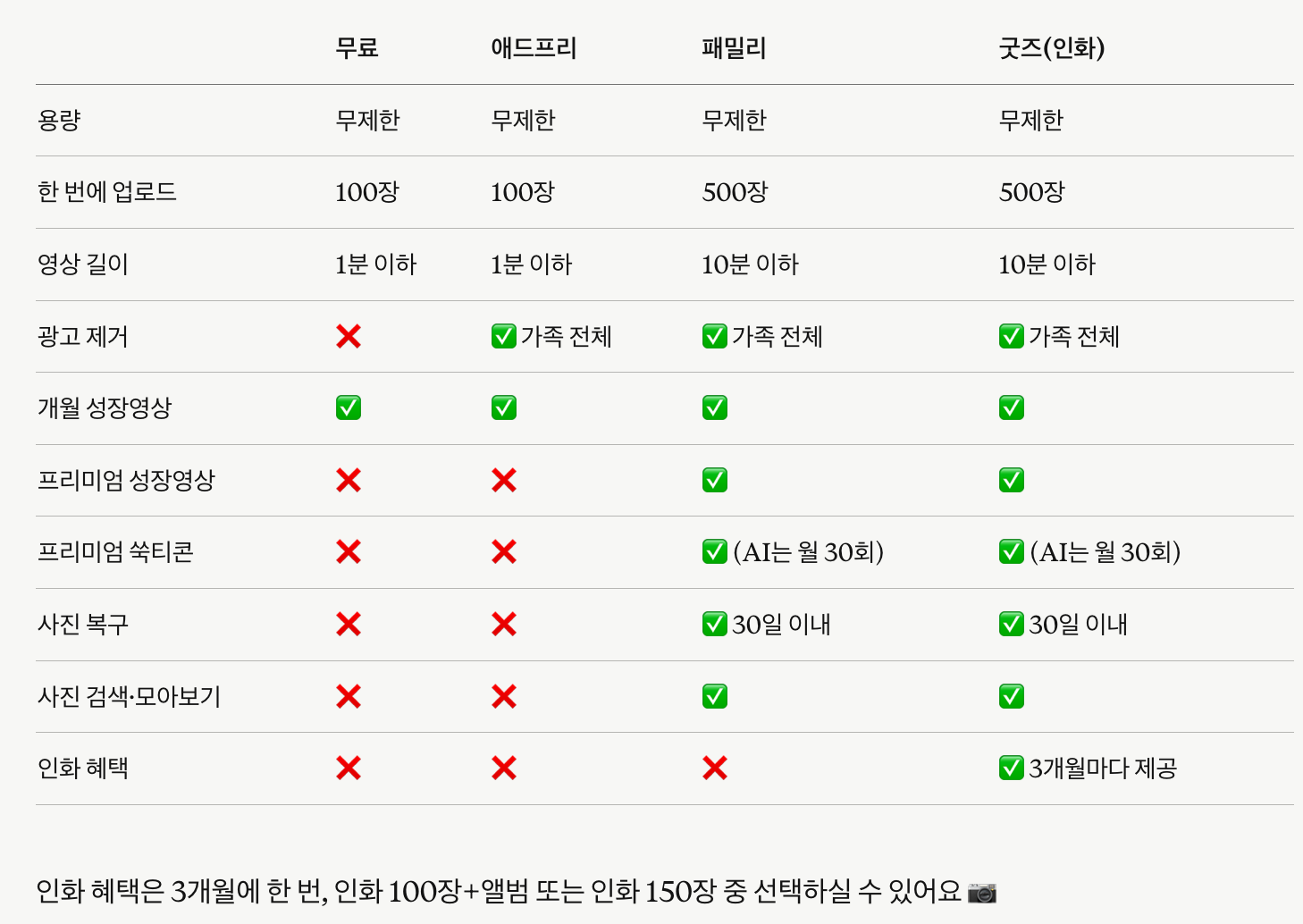
Here are the main benefits of each subscription plan.
① Family · Family HD+: Upload up to 500 photos at once, upload videos up to 10 minutes, ad-free experience for the whole family, unlimited creation of all Babyfolio videos, create animated stickers, photo recovery (30 days), and more.
② Premium: Same as the Family plan, but ad removal and certain benefits apply only to the subscriber.
③ Ad-Free: Upload up to 100 photos at once, ad-free experience for the whole family, free creation of Monthly and Birthday videos.
The free version allows uploading up to 100 photos at once and videos up to 1 minute.
Q. I saw that I could cancel after a 14-day free trial, so I went ahead with the payment, but the money was charged immediately.
If you have previously used a free trial, your payment will be processed immediately starting from your second subscription period without an additional free trial.
Q. I suddenly can't see the feeding schedule/records tab
If you can't see the feeding log button, please check if "Feeding Log Access" is turned on under My Page → Manage Family Access!
Q. Is the subscription refund calculated on a pro-rated basis?
Refunds are processed as a full 100% refund, rather than a pro-rated amount.
Google and Apple will issue a 100% refund after reviewing that there is no usage history.
Please wait just a little longer!
Q. I can't find photos I received through KakaoTalk
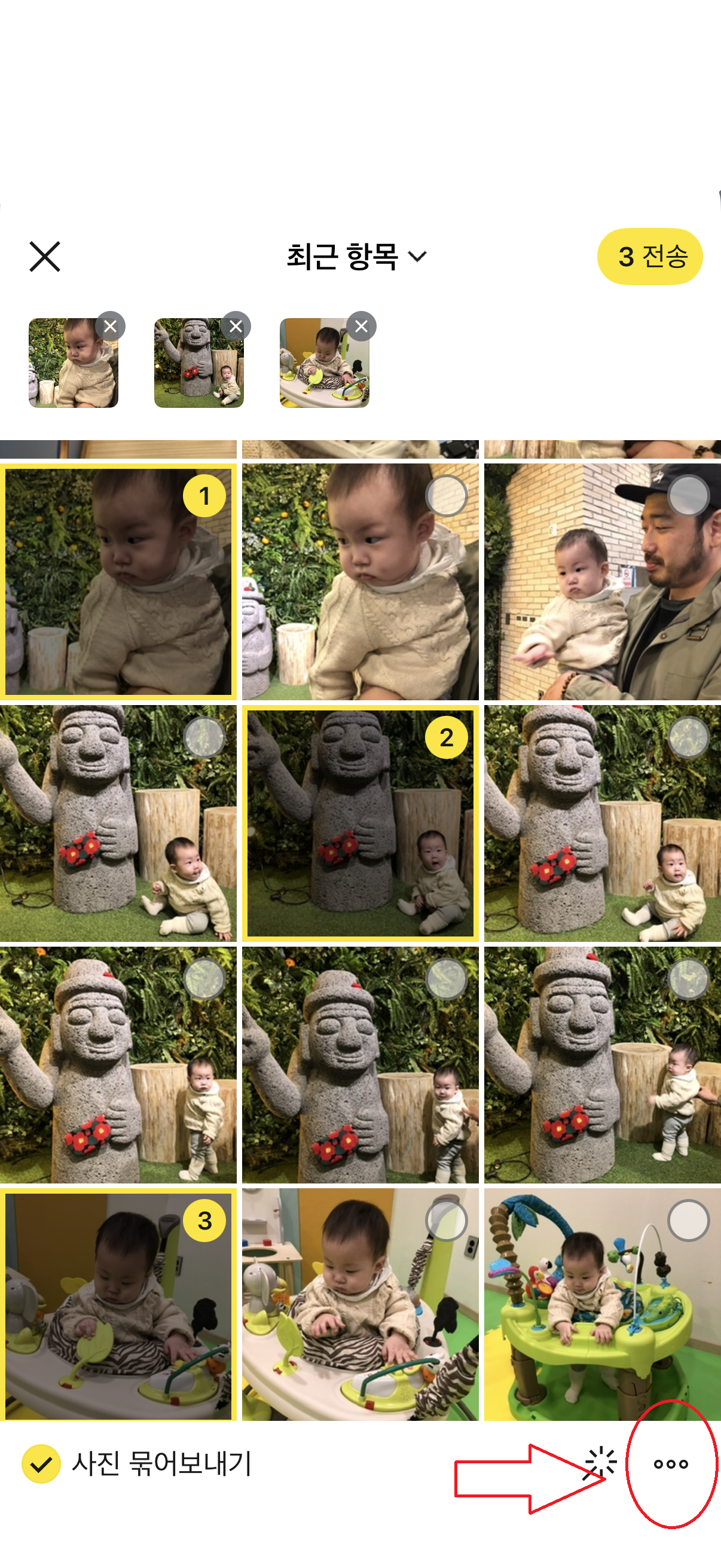
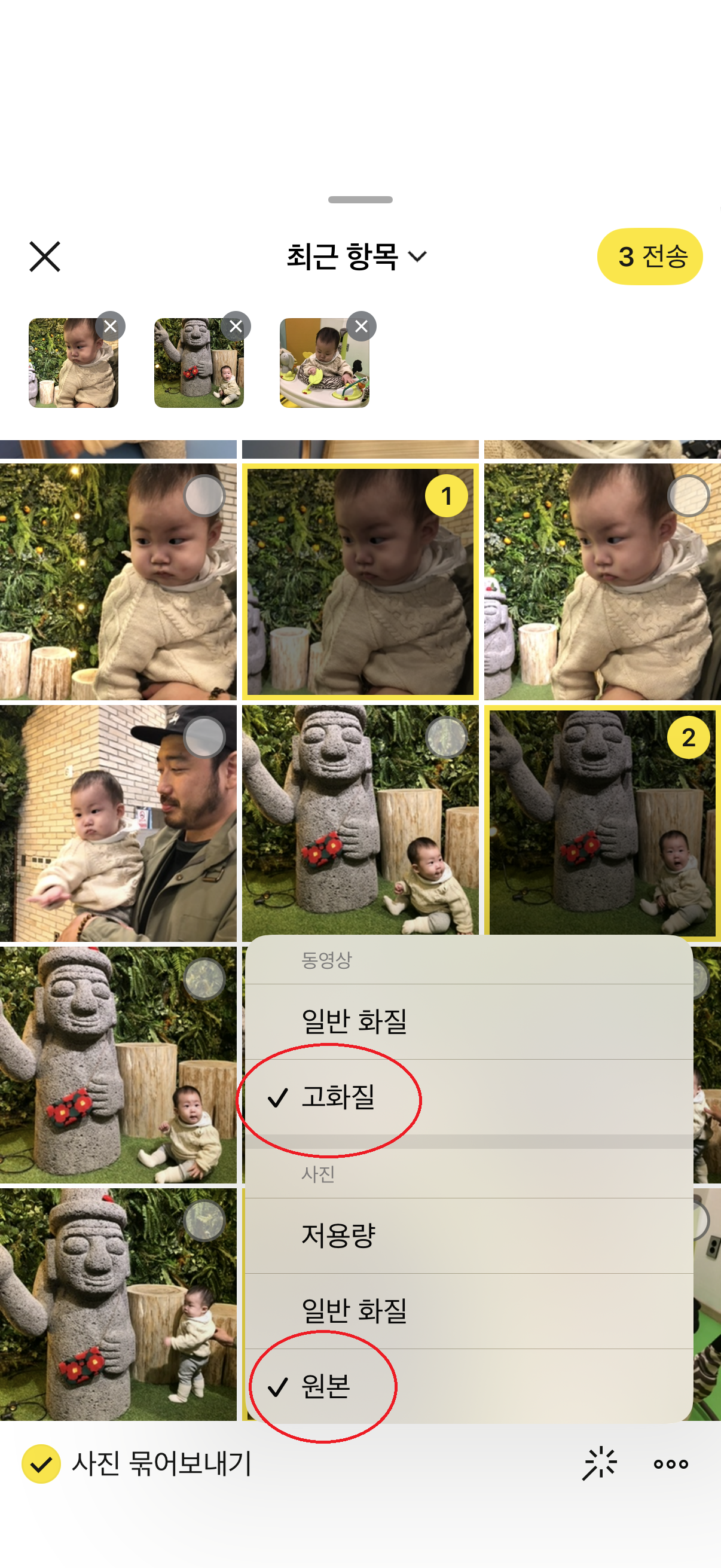
Photos received in standard or low quality on KakaoTalk are saved by the download date, so they may not appear if you search by the date they were taken.
On the other hand, photos received in original quality are saved by their actual capture date, so they may not appear in your recent photos.
Q. Ads are still appearing even though I have a subscription.
Please check the following steps!
First, try these: - Close the app completely and restart it - Update to the latest version in the App Store or Play Store
If you still see ads: My Page → Notice/Ad/Notification Settings → Remove Ads → Check if Ads (pop-ups, banners) are toggled OFF My Page → Subscription Settings & Management → Check if your subscription is applied to your family
Please note that the ad removal subscription benefits apply only to the administrator account that made the purchase.
To apply it to all family members, each person needs their own subscription.
We are currently reviewing improvements for this.
Q. Who owns the copyright for the Babyfolio Sukticon stickers?
The copyright for all assets and content—including Sukticon stickers, images, and designs provided by Babyfolio—belongs to Jejememe.
You can use Sukticons within the Babyfolio service and share photos or content created with them on external channels like social media and messengers.
However, extracting, duplicating, distributing, selling, modifying, reprocessing, or commercially using the original Sukticon assets is not permitted.
Q. Can I leave an album that has been shared with me?
Yes, you can leave.
Go to My Page > Account Management > Manage Family/Child, select the family you wish to leave, and tap Leave at the bottom right.
Please note that you cannot leave if it is the only family album you are currently participating in.
Q. Which products can I use Cheese for?
You can use Cheese in the Babyfolio app for:
Purchasing items in the Shop (Up to 500 Cheese per order)
Exporting all photos via email
When ordering products like photo prints or photo books, you can use your Cheese to get a discount by selecting the Cheese option on the payment screen.
Please note that Cheese can be used starting from a minimum of 100 Cheese. 😊
Q. It's taking a long time to create my Babyticon.
Creating your Babyticon takes about 10 seconds per template, but it may take up to a day when there are many requests.
We'll send you an app notification once it's ready!
If it's still not finished after 24 hours, please contact Customer Support.
Q. How long are Babyticons stored?
Babyticons and Animated Babyticons are automatically deleted from your temporary storage 15 days after creation.
Please make sure to save any stickers you need right after making them!
Q. How many photos can I upload at once?
With the free version, you can upload up to 100 photos at a time.
With a subscription plan (Family, Premium, etc.), you can upload up to 500 photos at once.
Q. I uploaded a video, but it's showing up as a black screen.
Please try the following steps in order: ① Force close the app and restart → ② Update to the latest version → ③ Delete the video and re-upload it If the issue persists after updating, please contact Customer Support and we'll look into it for you.
Q. Uploads are not working in the background.
Background uploading is supported, but due to Apple's policies, long-term background uploads are restricted, so only a small number of photos can be uploaded over a short period.
Please understand that this is a system limitation beyond Babyfolio's control.
Q. I cancelled my subscription through Google, but I was still charged a day before the renewal date.
Payment attempts may begin up to 24 hours before your scheduled billing date to prevent payment failures, per Google's policies.
Don't worry—this is standard procedure.
Q. Where can I watch my free growth videos again on Babyfolio?
You can find it by going to the Create tab at the bottom > Storage at the top > Babyfolio Videos.
Q. I'm currently subscribed, but the AI photo generation feature isn't working, and I can't see the different subscription plans.
AI photo generation is available starting from the Family subscription.
Please note that AI photos cannot be created with Premium or Ad-free subscriptions.
We appreciate your understanding!
Q. How do I create a Babyfolio Video?
Simply select your preferred video type in the Create tab, and a video will be automatically generated using your uploaded cover photos.
Monthly Growth and Birth videos can be created for free by watching an ad.
Specialized videos like 100 Days, 1 Year, Birthday Party, and Premium videos are available exclusively for Babyfolio subscribers (Premium and Family plans).
Q. Does cheese have an expiration date?
Yes, there is!
🧀 Cheese earned through Cheese Family and Upload Lottery rewards is valid for 60 days, so don't forget to make the most of it!
Q. Can the family members not see the GIFs?
For Live Photos and GIFs, only the first frame image will be uploaded.
The original file may appear normal on the uploader's own phone due to cached data.
Q. How will advertisements be displayed once there are over 1,000 photos?
Once your total uploads exceed 1,000 photos, an advertisement will be shown once a day when you upload photos.
For other family members (those who only view photos), banner ads will be displayed while viewing, regardless of the number of uploads.
If you'd like to enjoy Babyfolio without ads, please check out our Ad-Free or Family subscription plans 😊
Q. What happens to my photos if the Babyfolio service ends?
Your precious memories are safely stored with double backups.
While we have no plans to end our service, we will provide ample opportunity to download your files in the unlikely event of any changes.
Q. Original photos were lost during the backup or transfer process
We sincerely apologize for any inconvenience.
Photos uploaded to Babyfolio are safely stored on our servers and can be viewed within the app.
Please contact us through the [Inquiry] section so we can assist you with restoring your original photos.🙏
Q. Is there a way to make the photos appear in the order they were taken? Even though I took them in the order of 1, 2, 3, they are showing up as 3, 2, 1.
Currently, Babyfolio automatically sorts photos by date taken, with the newest first.
We're discussing a feature to change the order, but we can't provide a specific timeline yet—thank you for your understanding.
Q. Do cheeses have an expiration date?
Q. The dates on photos I received through KakaoTalk are wrong
When you receive photos through KakaoTalk, the saved date depends on how they were sent.
Sent as original → Saved with the date the photo was taken.
Sent as normal/low quality → Saved with the date downloaded from KakaoTalk.
For example, if you received a photo taken in 2023 in normal quality and saved it today, Babyfolio may classify it as today's photo.
Solution Ask the sender to resend the photo using … → Original when sending through KakaoTalk.
After receiving the original, upload it again and it will be saved with the correct date taken.
Q. Can I try it for free before subscribing?
New members who joined within the last 7 days can enjoy a 14-day free trial.
Please note that if you have previously subscribed or used a free trial, you will not be eligible for this benefit even if you re-register after deleting your account.
Q. If I change the sharing settings after uploading, will my family receive another notification?
No, changing the sharing scope after uploading will not send another notification to your family.
Q. Will family members receive a notification when I upload photos?
Yes, when you upload, a notification will be sent to the invited family members.
If they are not receiving notifications, please check if the notification permissions for Babyfolio are enabled on their phones.
Q. Can I save all the uploaded photos at once?
Yes, you can save them all at once.
Go to My Page > Photo Management > Download All and select the child you would like to download photos for.
Q. I've joined as an invited family member. Can I add my own child?
Yes, you can add your own child even if you joined as a family member.
Please select + Create My Family in My Page > Account Management > Family/Child Management.
Q. Can I create unlimited AI Babyticons?
You can create up to 30 AI Babyticons per family each month.
The count resets to 30 on the 1st of every month, and please note that any unused creations will not roll over to the next month.
Q. Can I delete an invited account?
Yes, you can delete it.
Go to My Page > Account Management > Family/Child Management, select the family that includes the account you want to delete, and then tap on that account.
Simply tap the Delete button at the bottom of the screen.
Q. It's asking for an invitation code. What should I do?
On Babyfolio, you can invite your family using a family invitation link instead of an invitation code 😊
Please follow these steps to invite your family:
Go to My Page → Manage Family/Baby → Family List → Family Details page.
Select ‘Invite family to see our baby’s photos’ to generate an invitation link.
Share the generated link with your family via KakaoTalk or by copying the link.
The invited family member must sign up through the received invitation link to be connected to the family 📱
If they log in with an existing account beforehand, the family connection may not work properly, so please make sure they sign up via the link.
If you have any difficulties creating an invitation link or connecting with your family, please contact our customer center. We’ll be happy to help! 😊
Q. What is the scope of ad removal for family members upon subscription?
A paid subscription applies benefits to all members within your family group!
For more details, please refer to the user guide on our website🙏
https://jejememe.com/kr/guide/subscription#subscription-plans
Q. Can I edit or delete my comments?
Comments cannot be edited.
However, you can delete any comments you have written yourself.
Admin accounts have the authority to delete all comments, including those left by other family members.
Q. I'm already subscribed to Ad-Free. Will my price increase?
Members who are already subscribed to the Ad-Free monthly plan will continue to renew at their existing monthly price.
This price change applies only to new subscribers, and the new subscription price for the Ad-Free monthly plan is $4.99 per month.
Please note that if you cancel your existing subscription and subscribe again later, it may be treated as a new subscription and the updated price may apply.
Q. I can't find photos for a specific date. How can I check them?
Some image files may not contain date information, such as when they were taken.
In these cases, photos might not appear under the expected date right away.
When adding photos in Babyfolio, tapping the + button may show photos with date information first.
If you select a specific date from the calendar, photos from that date will appear first, followed by the rest in chronological order.
If you can't find the photo you're looking for, please try selecting the date on the calendar once more.
Q. I switched from iOS to Android; will my subscription still be active?
Subscriptions are applied based on your account, not the platform.
If you log in with your existing account on Android, your subscription will remain active.
However, if you wish to change your payment method (from Apple to Google), please start a new subscription on Google Play after your current Apple subscription expires.
Please be careful, as subscribing before the expiration date may result in duplicate charges.
Q. All viewers' names are appearing as the same name.
In Babyfolio, family members' names are displayed based on the 'Family Nickname' set for each family group.
If a nickname is set simply as 'Grandmother,' multiple members might appear with the same name, making it difficult to tell them apart.
If you are a family admin, you can change nicknames using the following method:
Manage Family/Baby → Select Family → Select the family member whose name you want to change → Change Name
Try setting names that are easy to distinguish, such as 'Paternal Grandma,' 'Maternal Grandma,' or 'Grandma in New York.'
※ Regardless of their global nickname, the 'Family Nickname' will be prioritized within that specific family group.
Q. What happens if I cancel during my subscription?
You can continue to enjoy your subscription benefits until the end of your current billing period.
Please note that videos longer than 1 minute uploaded during your subscription will no longer be playable after cancellation and will only be available for download.
Q. Can I use Babyfolio abroad?
Yes, Babyfolio can be used anywhere in the world 🌏
However, the available easy login methods vary depending on the app's language settings.
Korean: KakaoTalk · Naver · Google · Apple
Japanese: LINE · Google · Apple · Email
English: Google · Apple · Email
Even from abroad, you can upload photos and videos, invite your family, and share your little one's growth journey together 😊
Q. If I cancel my subscription, will my photos be deleted?
No, they won't be deleted!
However, videos over 1 minute can only be downloaded and won't be available for preview within the app.
Q. I received a notification for a photo that was uploaded to another family
Babyfolio photos and notifications are sent only to family members who are registered to that specific family group.
Since data is separated by each family, it is impossible for photos from one family to be sent as notifications to another.
Please check if the account that received the notification is participating as a member of that family:
Family Settings → Family List → Check participating family
Q. What is the difference between the Annual Premium and Annual Family plans?
The features are the same, but with the Premium plan, only the subscriber receives the benefits.
With the Family plan, all invited family members can enjoy Premium benefits together.
Q. I would like to change my subscription payment method.
You can change your payment method directly through each app store.
🍎 iOS Settings App → Tap your name → Payment & Shipping → Add Payment Method → Enter details and tap Done.
https://support.apple.com/en-us/118429?device-type=mac 🤖 Android Google Play Store → Profile icon at the top right → Payments & subscriptions → Update or add under Payment methods.
https://support.google.com/googleplay/answer/4646404?hl=en
Q. Can I change the privacy settings for multiple photos at once?
Yes, you can change them all at once.
Go to My Page > Manage Photos > Bulk Change Sharing Settings to update the visibility of multiple photos at the same time.
Q. I requested a refund after canceling my subscription through Google. How long will it take?
Refunds are processed within 30 minutes at the earliest and can take up to 7 days.
Q. Can the child photos uploaded to Babyfolio be used arbitrarily?
Children's photos, baby photos, and family photos uploaded to Babyfolio are used solely for providing services such as photo organization, growth album management, and backups.
Jejememe does not use your uploaded child's photos for advertising, marketing, or promotional content without your consent.
Furthermore, we do not access your photos arbitrarily or share them externally beyond what is necessary for service operation.
Because children's photos are precious family records, we process photo data only within the necessary scope.
Q. I subscribed, but I'm still seeing ads. Isn't ad-free viewing a benefit of the subscription?
The ad-free benefit is applied to the account of the manager who purchased the subscription.
Ads may still appear on the devices of family members (invited family) unless they have their own separate subscription.
To remove ads for the entire family, each individual account requires a subscription.
We apologize if this was not clearly explained.
We will pass this along as a suggestion for improvement.
Q. Can both sets of grandparents see each other's comments?
Comments from both sides of the family are kept separate!
Maternal and paternal family comments are divided into different sections.
If you wish to disable comments entirely, you can go to My Page → Family/Baby Management and turn the "Allow Comments" toggle OFF.
Q. What is the maximum length of a video I can upload?
With the free version and Ad-Free subscription, you can upload videos up to 1 minute.
With higher plans like Family and Goods subscriptions, you can upload videos up to 10 minutes.
With the Family High-Definition+ subscription, you can also upload high-quality FHD (1080*1920) videos!
Q. If I delete photos from my phone after uploading them to the app, will they also disappear from Babyfolio?
No, photos uploaded to Babyfolio will remain in the app even if you delete them from your phone.
However, if you have enabled automatic gallery synchronization, any synchronized edits or changes may be reflected.
Q. I'm having trouble uploading photos and videos.
Please try the following steps in order: ① Close the app completely and restart → ② Update to the latest version → ③ Try on both Wi-Fi and mobile data (LTE/5G) If the problem persists, please send a screen recording or screenshot of the error to Customer Support, and we'll look into it for you!
Q. I shared these photos only with my family; will my in-laws also receive a notification?
Notifications will be sent based on the sharing scope selected during upload.
If you select "Maternal Family Only," notifications will be sent only to the couple and the maternal family members.
Q. I canceled my subscription, so why was I charged?
Canceling your subscription stops future payments.
If you want a refund for a payment that's already been made, you'll need to request a refund separately.
Please note that all refund requests must be submitted directly through the store.
- iPhone: https://support.apple.com/en-us/118223 - Android: https://support.google.com/googleplay/workflow/9813244
Q. After uploading photos to Babyfolio, I noticed that edits made in the iPhone gallery are reflected in the app in real time. Is there a way to turn this off if I don't want them linked?
This happens because we first show photos from your phone's gallery to display images and videos quickly while reducing data usage.
Any edits made in your gallery will only be visible on your phone, while other family members will see the original version uploaded to the Babyfolio server.
Q. Photos I uploaded from KakaoTalk have the wrong dates.
Photos downloaded from KakaoTalk or cloud storage are saved with the download date rather than the original photo date.
To save them on the correct date, please select the desired date from the calendar on the home screen before uploading.
Q. Can I upload videos with the sound muted?
Yes, you can!
After selecting the video you want to upload, tap Edit Video to mute the sound before uploading.
However, the mute editing feature is a premium benefit for Babyfolio subscribers and is only available for accounts with an active subscription.
Q. The Babyfolio screen looks cropped or zoomed in
If the Babyfolio screen appears cut off or zoomed in, please check your phone's display settings 😊
If you are using an iPhone, please change the setting below and restart the app.
Settings → Accessibility → Button Shapes → OFF
After changing the setting, close the Babyfolio app completely and relaunch it to see the normal screen 📱
If the screen still appears zoomed in or cut off after trying this, please let us know your device model and app version, and we will look into it for you.
Q. [Notice] Videos Appearing Darker During Playback on Android
Hello, this is the Babyfolio team 😊
We have identified an issue where videos may appear darker than the original when played within the app on some Android devices.
📍 Currently Identified Issues
Videos may appear darker when played within the app on some Android devices.
There may be slight differences in brightness or color between the original video and the video played within the app.
We have confirmed that this issue does not affect the original video itself and occurs only during playback within the app.
📍 Current Status
We have completed a fix for the issue causing videos to appear darker on some Android devices, and the updated version is currently under review by the app store.
Once the review is complete, we will release the update. Please update the app to the latest version once it becomes available.
Additional Improvements
Depending on the device model or video recording environment, there may still be slight differences in brightness or color between the original video and how it appears during in-app playback.
We are continuing to test video playback across various devices and environments and will make further improvements through future updates.
To Our Members
We sincerely apologize for any inconvenience this may have caused.
As Babyfolio is a place where you save and revisit your child's precious moments, we will continue working to provide a more stable and natural video playback experience.
Once the update becomes available, please update the app to the latest version.
Thank you for capturing and preserving your child's precious moments with Babyfolio 💛
The Babyfolio Team
Q. Does uploading photos reduce the storage space on my phone? Also, how much free space do I need to have available to upload them?
Uploading to Babyfolio does not reduce your phone's storage space.
However, since files are saved in "Standard Quality," we recommend backing up your original high-resolution photos elsewhere.
While Babyfolio offers unlimited upload storage, the app saves cache data during the upload process, similar to KakaoTalk.
* If the app is taking up too much space, you can clear it by going to "My Page > Service Settings > Clear Cache."
Q. I selected a date and uploaded them, but photos and videos from different dates are being uploaded together.
When a photo or video has a filename in a date format (e.g., 20260701), Babyfolio prioritizes the date in the filename over the shooting date metadata.
This often happens with photos downloaded from apps like Instagram, KakaoTalk, or Kids Note, where the filename may not match the actual date the photo was taken.
For example, if a photo was actually taken on July 2nd but the filename is saved as 20260701, it will be recognized as a July 1st photo and uploaded along with others from that date if you select July 1st for upload.
How to Fix This
Before uploading downloaded photos or videos, please check if the filename contains a date.
If the date in the filename differs from the actual shooting date, please rename the file to match the correct date before uploading.
Alternatively, you can manually select the specific date you want when uploading.
Q. I subscribed, but the benefits are only being applied to one child.
Subscription benefits for Babyfolio are applied per family unit, not per child or account.
Please first check which family the child's data is registered under.
If the benefits are still not applied, please contact Customer Support.
Q. The upload button has suddenly disappeared
If the upload button isn't visible, please go to My Page → Family Permissions and check if "Upload Permission" is turned on!
Q. Can I download all the photos at once?
You can currently download individual photos and videos for free.
Bulk downloading is available after charging Cheese via My Page → Download All!
Q. Do you also collect my child's personal information?
Due to the nature of our service for recording your child's growth, Babyfolio collects the child's name (nickname), gender, and date of birth directly entered by you.
This information is used solely for providing growth records and content within the service, and is not utilized for any other purposes, such as marketing.
Babyfolio does not provide personalized advertisements targeted at children under the age of 14.
Q. How can I cancel my subscription?
iOS: App Store → User Name → Subscriptions → 'Babyfolio' → Cancel Subscription Android: Google Play Store → Manage Account → Payments & Subscriptions → 'Babyfolio' → Cancel Subscription Please note that your subscription will automatically renew unless canceled at least 24 hours before the expiration date!
Q. Can I upload photos from my PC to Babyfolio?
We're well aware of the many requests for PC upload and a PC version, and we fully recognize the need for these features.
However, because PC upload and a web version require a different structural development process compared to the app, we can't provide a specific timeline at this time—thank you for your understanding.
Q. Can my family not see the Live Photos?
Live Photos and GIFs will be uploaded using only the first frame image.
The original file may appear to display correctly on the uploader's own phone due to the saved cache.
Q. Can I delete the uploaded photos all at once?
Yes, you can organize them by date all at once.
After selecting the date you want to delete from the calendar, tap the ⋯ button in the top right corner.
Tap Select Photos to delete all photos from that specific date at once.
Q. How are ads managed on Babyfolio?
We sincerely apologize if frequent or long advertisements have caused you any inconvenience. 🙏
To continue providing unlimited free photo storage, Babyfolio displays advertisements for users who have stored more than a certain number of photos. We are currently filtering problematic ads in real-time, such as excessively long ads, ads where the close (X) button is missing or unresponsive, and inappropriate content.
However, as new ads are constantly being registered and updated, it can be difficult to block 100% of them in advance. 😢
If you encounter any excessively long ads, ads without a working X button, or inappropriate/suggestive content, please report them to our Customer Center. We will review your report and take action to block or improve the ad quality.
If you prefer to use Babyfolio without any ads, you can enjoy an ad-free experience by going to My Page → Subscription Settings → Ad-Free Subscription to remove all pop-ups and banners. ✨
Q. How do I set up push notifications for Babyfolio?
You can manage Babyfolio push notifications through both the app settings and your phone's system settings 😊
First, please check if all notification settings within the Babyfolio app are toggled OFF.
If you are still receiving push notifications after turning them off in the app, please check your phone's system notification permissions as well 📱
iPhone (iOS): Settings → Babyfolio → Notifications → Allow Notifications OFF
Android: Settings → Apps → Babyfolio → Notifications → OFF
Since the app's notification settings and your phone's system permissions are applied separately, we recommend checking both if you wish to completely disable Babyfolio push notifications.
Please note that certain essential notices, such as important service changes, may still be sent regardless of your notification settings.
If you continue to receive push notifications after checking all of the above settings, please contact our Customer Support. We’ll be happy to help! 😊
Q. I noticed the photo quality decreased after downloading. Is there a way to keep the original high quality?
Babyfolio compresses videos to standard quality during upload, regardless of whether you're using a free or paid plan.
The specific quality may vary depending on the original size and volume of the file.
We strive to preserve metadata as much as possible, but videos are uploaded with adjusted resolution and bitrate.
Q. Is Babyfolio free to use?
Yes, you can use all the basic features of Babyfolio, including unlimited storage for photos and videos, completely for free 😊
Please note that once you upload a certain amount of content, ads may be displayed to help us keep the service running.
If you'd like to enjoy Babyfolio without any ads, please check out our Ad-Free Subscription Plan ✨
For more details on free usage and subscription plans, go to My Page → Subscription Settings & Management within the app.
Q. Can I save an unlimited number of photos and videos on Babyfolio?
Yes, you can store unlimited photos and videos on Babyfolio 😊
Record your child's precious moments without worrying about storage space, and share these memories with your family :)
Q. What happens to my photos and videos if I leave Babyfolio?
When you delete your Babyfolio account, all photos and videos you uploaded will be deleted immediately and cannot be recovered.
This applies to both administrator and member accounts.
If you wish to keep your precious photos and videos, please make sure to download them before proceeding with the deletion. 😊
Q. The feeding intervals do not match the actual time
Please update the app to the latest version.
If the issue persists after the update, please contact Customer Support and we'll look into it for you 🙏 If you are living abroad, go to My Page → Service Settings → Timezone Settings to set the correct timezone for your current location!
Q. How do I check the version of the Babyfolio app?
You can check your Babyfolio app version by following the steps below 😊
My Page → Service Settings → Version
You can see the currently installed Babyfolio app version in this menu.
If you encounter an error or need to contact customer support, providing your current app version will help us assist you more accurately 📱
Q. What are my rights regarding my data?
You can exercise the following rights at any time:
- Access: Confirm the collection and usage history of your personal information.
- Rectification: Request correction of any inaccurate information.
- Deletion: Request the deletion of your personal information (except for information required to be stored by law).
- Suspension of Processing: Request to stop the processing of personal information for specific purposes.
You can make these requests through the in-app Help Center or via email (cs@jejememe.com), and we will process them promptly.
Q. How do I update the Babyfolio app?
You can update the Babyfolio app to the latest version by following the steps below 😊
iOS (iPhone)
Open the App Store
Search for ‘Babyfolio’
Select the Babyfolio app with the yellow icon
Tap the Update button
Android
Open the Google Play Store
Search for ‘Babyfolio’
Tap the Update button
If you don't see the update button, the latest version might still be in the process of rolling out or being reflected in the store. Please try checking again in a little while 😊
Q. The Babyfolio app is crashing or closing unexpectedly.
If you encounter an error while using Babyfolio, please try the following steps 😊
Completely close and restart the app
Update to the latest version
Delete and reinstall the app
If the same issue persists after trying these steps, please send a screenshot or screen recording of the error to our customer support center. We will check it and help you right away 🙏
Q. How do I invite family members?
Go to My Page → Family/Baby Management → Family List → Family Details page → and tap 'Invite family to see baby photos' to generate a link.
You can then share it via KakaoTalk or by copying the link 😊
The invitation link can be used by multiple people, so feel free to post it in your family group chat to invite everyone at once!
Q. I sent a family invitation link, but it's not linking properly.
Please check if the invited person logged in directly with an existing account instead of signing up through the invitation link.
They must sign up via the invitation link to be linked as a family member.
If the issue continues, please contact Customer Support!
Q. Can I remove someone from the family administrator role?
You can change this by going to My Page → Manage Family/Baby → Family Member Profile → Edit Info → "Remove Admin."
Alternatively, you can contact Customer Support and we'll take care of it for you.
Please note that if you delete a family member, all data uploaded by that person will also be deleted!
Q. I uploaded photos/videos, but other family members can't see them on their phones.
Please check the sharing settings for your uploaded photos and videos!
If they are set to 'Couple Only,' other family members won't be able to see them.
Simply change the sharing range to 'Share with Everyone' when uploading.
If you'd like to see your photos and videos organized by their sharing settings at a glance, go to the Album tab → View Photos by Sharing Range.
You can also change the sharing settings directly from that screen.
(A special benefit for Family and Goods subscription members)
Q. I changed my phone, but I can't log in to my existing account.
Please log in again using your original login method (KakaoTalk, Naver, Google, Apple, or Email) 😊
To access your existing account, you must log in using the same method you used when you first joined Babyfolio.
If you're still having trouble finding your account, please send your baby's name and date of birth to our customer center. We will help you locate your account after verifying the details 🙏
Q. Can I use Babyfolio on a PC (web) as well?
Yes, you can also view your uploaded photos on the Babyfolio web version (thebabyfolio.com) 😊
However, most features such as uploading photos, writing comments, and downloading are available within the app.
To record your photos more conveniently and share them with your family, please use the Babyfolio app 📱
Q. Which languages does Babyfolio support?
Yes, Babyfolio supports Korean, English, and Japanese 🇰🇷🇯🇵🇺🇸
You can change the app language through the following path:
My Page → Settings → Language
Simply select your preferred language, and the app will be displayed in that language 😊
Also, if your phone's system language is set, the app language may be automatically applied according to your device settings.
Q. What kind of app is Babyfolio?
Babyfolio is a parenting app where you can store unlimited photos and videos of your child and share them with your family in real-time 📸
From creating growth albums and photo printing to syncing with digital frames and tracking feeding schedules, you can manage every moment of your child's journey in one place💕
Q. What makes Babyfolio different from other baby photo-sharing apps?
With Babyfolio, you can enjoy all the essential features for recording your child's growth in one single app 😊
Unlimited photo and video storage
Invite unlimited family and friends
Record a growth album
Photo printing services
Digital photo frame integration
Share your child's precious moments in real-time with grandparents and family members far away, and create beautiful memories together 👨👩👧✨
Q. How do I use Babyfolio comment Ssookticons?
Tap your child's photo to open the comment window 💬
Tap the Babyfolio icon at the bottom right of the comment window, and a list of available comment Ssukticons will pop up.
Just tap the Ssukticon you want, and you can post it right in the comment ☺️
Q. What items can I record in the feeding log?
You can record 7 essential routine items: Breastfeeding, Formula, Solid food, Diapers, Sleep, Pumping, and Bottle-fed breast milk.
You can also track various other activities such as Hospital visits, Notes, Temperature, Medication, Snacks, Tummy time, and Play!
By logging daily, you can check your baby's total daily statistics at a glance 😊
Q. Can AI Sookticons be made for free?
Yes, you can create an AI Babyfolio sticker once for free 🎁
If you'd like to make multiple stickers in various designs, a subscription is needed.
Please subscribe when you want to create more stickers with your little one's photos 😊
However, even if you're using a subscription through a free trial, the AI sticker free-once policy still applies.
If you've already used your free creation, additional creations may not be possible during the free trial period.
Q. What is a Babyticon?
Babyticons are custom emojis you create using your baby's photos.
Simply cut out their face and add it to various templates.
Classic Babyticons are free to use.
Moving Babyticons, AI Babyticons, and Multiple Babyticons are available with a Babyfolio subscription.
Q. Can I save the Babyfoli-cons I made to my phone album?
Yes, the Ssukticons you create can be saved to your phone's photo album 📱
Go to the Create category at the bottom of the Babyfolio app.
Tap the drawer icon in the top right corner to open your Ssukticon storage.
However, the drawer icon only lets you view your created Ssukticons — it doesn't offer a download feature.
To save them to your phone's photo album, tap the download icon in the bottom right corner.
Select the Ssukticon you want from your storage, then tap the download icon to save it to your phone's photo album 😊
Q. Can I use the Babyfolio keyboard on iPhone too?
The Babyfolio keyboard is currently available first on Android 🤖
We're working quickly to make Babyfolio icons available more conveniently on iPhone as well.
Please bear with us just a little longer ☺️
In the meantime, you can save the icons you create to your phone's album and attach them in KakaoTalk just like a photo 💛
Q. How do I turn on the Babyfolio keyboard?
On Android phones, you can register and use the Babyfolio keyboard ⌨️
Please follow the steps below in the Babyfolio app.
Service Settings > Keyboard Settings > Register Keyboard
Once you've registered the keyboard, you can use Ssukticons through the Babyfolio keyboard in other apps like KakaoTalk too ☺️
Q. I applied for a Babyfolio Milestone Video, but I haven't received a completion notification yet.
Video creation can take up to one day.
If it's still not complete after 24 hours, please contact Customer Support and we'll quickly look into it and request a remake for you.
Q. The comment Ssukticon icon isn't showing up.
If you don't see the Babyfolio icon in the comments window, please first check that your app is up to date 🔎
If the icon still doesn't appear after updating the app, please completely close the Babyfolio app and reopen it.
If it still doesn't show up, reach out to our customer service and we'll be happy to help you figure it out 💛
Q. How can I download photos and videos?
You can only download files if the administrator has granted download permission to family members.
If you have permission, open the photo or video and tap the download button in the top right corner.
If you're unable to download, please ask the administrator to check your permission settings.
Q. I can't see the photos I uploaded. I can see them on my end, but they aren't visible to others, and when I try to re-upload them, it says they have already been uploaded.
Please select the date when the photos aren't visible to your family members and check the sharing range setting.
If it's set to "Couple Sharing," other family members won't be able to see them.
Q. Location tags are added automatically. How can I delete them?
You can adjust this setting by going to 'My Page > Service Settings > Location Tag on Upload'.
Q. The upload is not working.
Please search for "Babyfolio" in the app store, update to the latest version, and try again.
If the issue persists after updating, please check the following: 1.
Does the upload fail on all connections (Wi-Fi, LTE, 5G)?
2.
Does the issue continue even after reinstalling the app?
If it still doesn't work, please go to Customer Support > Contact Us and send us a screenshot or screen recording of the error so we can look into it.
Q. Are photos uploaded in their original quality? I'm wondering if the resolution changes when uploading or downloading.
Whether free or paid, videos uploaded to Babyfolio are compressed to standard quality.
The final result may vary depending on the original video's size and file volume.
While we strive to preserve metadata as much as possible, resolution and bitrate are lowered during the upload process.
If the user who uploaded the video has the original file still saved on their device without any edits, Babyfolio will display the original file to help save on data usage.
Since Babyfolio provides unlimited storage capacity, please understand that we are unable to store original high-resolution files.
Q. Is Babyfolio safe?
Yes, Babyfolio is safe.
Photos and videos you upload are only visible to you and family members invited to the album—they are not shared externally.
Our servers are protected by firewalls, secure password management, two-factor authentication, and SSH key authentication.
Communication between your device and our servers is encrypted, and we continuously improve our security levels.
Q. What information do I need to register to use the Babyfolio app?
When signing up, you'll need to provide the following information:
- Email address or social account (Kakao, Google, Naver, Apple)
- Name (Nickname) - Relationship to the child
- Child's name (Nickname), gender, and date of birth
If you sign up using a social account, some additional information provided by the platform (such as nickname or email) may be collected.
For more details, please refer to our Privacy Policy.
https://jejememe.com/en/privacy
Q. What additional information does Babyfolio collect?
During service use, the following information may be collected automatically:
- IP address, device information
- Date/time of visits and service usage history
- Service usage logs - Metadata that may be included in uploaded photo and video files
- Date and time of capture, image orientation, device information, location data, etc.
- In-app input data such as search terms When using paid services, additional information such as card details or mobile phone numbers may be collected depending on the payment method.
Q. What is the purpose of data collection at Babyfolio?
We use the collected information only for the following purposes: - Service provision and member management (identity verification, family invitations, album management, etc.)
- Improving service quality and providing personalized features
- Payment for paid services and product delivery
- Marketing and event announcements (only for those who have given prior consent) Your information will not be used for any purpose other than those stated above and will be promptly deleted once the objective has been achieved.
Q. Who is my personal data shared with?
As a rule, we do not share your personal information with third parties without your prior consent.
Exceptions may apply in the following cases: - Trusted partners essential for service operations (payment processing, delivery, cloud infrastructure, etc.)
- Legitimate requests from investigative agencies in accordance with laws and regulations - Successions of rights and obligations, such as mergers and acquisitions (provided with prior notice) For advertising optimization, behavioral data may be shared with platforms such as Google, Meta, and AppLovin.
You can opt out of this at any time in the app settings.
Q. How long does Babyfolio retain personal information?
Your data will be promptly destroyed upon withdrawal of membership or once the purpose of service use has been fulfilled.
However, information required by law will be retained for the following periods: - Records on contracts or withdrawal of offers: 5 years - Records on payment and supply of goods: 5 years - Records on consumer complaints or dispute resolution: 3 years - Records on service visits and usage: 3 months Notice regarding inactive accounts: For accounts that have not been logged into for more than one year, saved content and personal information will be deleted after prior notification via email and push notifications.
Please note that data cannot be recovered once it has been deleted.