Payment
Q. I saw that I could cancel after a 14-day free trial, so I went ahead with the payment, but the money was charged immediately.
If you have previously used a free trial, your payment will be processed immediately starting from your second subscription period without an additional free trial.
Q. What are the benefits of subscribing to Babyfolio?
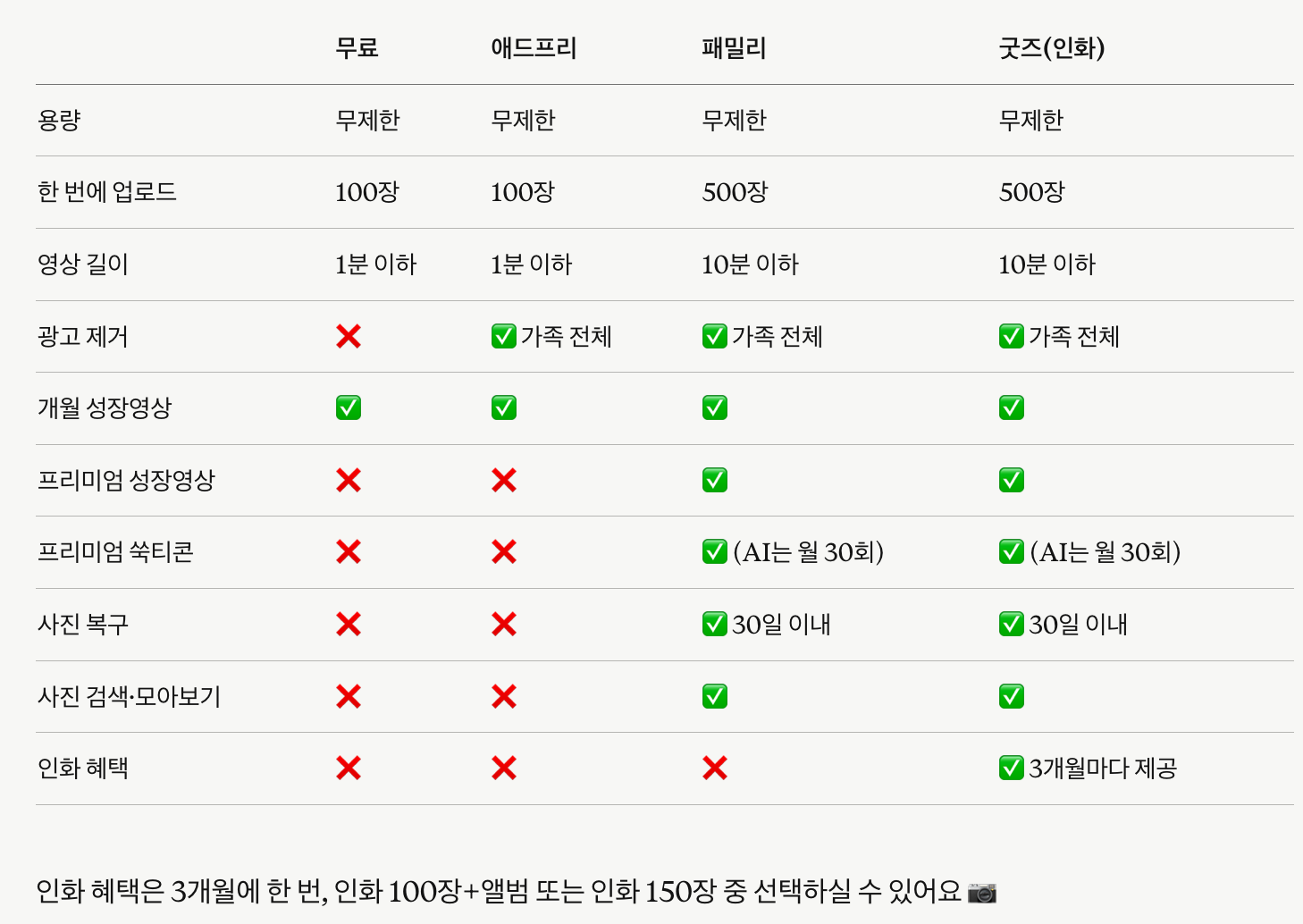
Here are the main benefits of each subscription plan.
① Family · Family HD+: Upload up to 500 photos at once, upload videos up to 10 minutes, ad-free experience for the whole family, unlimited creation of all Babyfolio videos, create animated stickers, photo recovery (30 days), and more.
② Premium: Same as the Family plan, but ad removal and certain benefits apply only to the subscriber.
③ Ad-Free: Upload up to 100 photos at once, ad-free experience for the whole family, free creation of Monthly and Birthday videos.
The free version allows uploading up to 100 photos at once and videos up to 1 minute.
Q. I requested a refund after canceling my subscription through Google. How long will it take?
Refunds are processed within 30 minutes at the earliest and can take up to 7 days.
Q. Is the subscription refund calculated on a pro-rated basis?
Refunds are processed as a full 100% refund, rather than a pro-rated amount.
Google and Apple will issue a 100% refund after reviewing that there is no usage history.
Please wait just a little longer!
Q. Ads are still appearing even though I have a subscription.
Please check the following steps!
First, try these: - Close the app completely and restart it - Update to the latest version in the App Store or Play Store
If you still see ads: My Page → Notice/Ad/Notification Settings → Remove Ads → Check if Ads (pop-ups, banners) are toggled OFF My Page → Subscription Settings & Management → Check if your subscription is applied to your family
Please note that the ad removal subscription benefits apply only to the administrator account that made the purchase.
To apply it to all family members, each person needs their own subscription.
We are currently reviewing improvements for this.
Q. I purchased Cheese, but it's not showing up in my balance.
There can be a slight delay in the server processing your payment.
Please close the app completely, restart it, and check My Page → Cheese again.
If it still hasn't been updated, please contact Customer Support with a screenshot of your payment history.
Q. One of my family members is currently subscribed using a T Universe coupon. Can I receive the benefits together with them?
Currently, T Universe Premium benefits apply only to the individual subscriber.
To enjoy Babyfolio together with your whole family, please subscribe to the Family Plan.
Q. I cancelled my subscription through Google, but I was still charged a day before the renewal date.
Payment attempts may begin up to 24 hours before your scheduled billing date to prevent payment failures, per Google's policies.
Don't worry—this is standard procedure.
Q. What is Cheese? How do I use it?
Cheese is a point system you can use within the app.
You can top it up via in-app purchases or earn it for free through activities like inviting friends and daily uploads.
Purchased Cheese is valid for 5 years from your last date of usage.
Q. I'm trying to subscribe using a T Universe coupon, but it says "Already Subscribed" and won't let me register.
T Universe coupons can only be applied when you are in an unsubscribed state.
Please apply after your existing subscription has been fully canceled and refunded.
Q. T-Space benefits are not available for family members.
Starting in February, T-Space benefits changed from family-wide to individual use only.
Please check the T-Space details page for more information.
Q. I'm currently subscribed, but the AI photo generation feature isn't working, and I can't see the different subscription plans.
AI photo generation is available starting from the Family subscription.
Please note that AI photos cannot be created with Premium or Ad-free subscriptions.
We appreciate your understanding!
Q. I subscribed, but I'm still seeing ads. Isn't ad-free viewing a benefit of the subscription?
The ad-free benefit is applied to the account of the manager who purchased the subscription.
Ads may still appear on the devices of family members (invited family) unless they have their own separate subscription.
To remove ads for the entire family, each individual account requires a subscription.
We apologize if this was not clearly explained.
We will pass this along as a suggestion for improvement.
Q. Can I try it for free before subscribing?
New members who joined within the last 7 days can enjoy a 14-day free trial.
Please note that if you have previously subscribed or used a free trial, you will not be eligible for this benefit even if you re-register after deleting your account.
Q. What is the scope of ad removal for family members upon subscription?
A paid subscription applies benefits to all members within your family group!
For more details, please refer to the user guide on our website🙏
https://jejememe.com/kr/guide/subscription#subscription-plans
Q. I'm already subscribed to Ad-Free. Will my price increase?
Members who are already subscribed to the Ad-Free monthly plan will continue to renew at their existing monthly price.
This price change applies only to new subscribers, and the new subscription price for the Ad-Free monthly plan is $4.99 per month.
Please note that if you cancel your existing subscription and subscribe again later, it may be treated as a new subscription and the updated price may apply.
Q. I switched from iOS to Android; will my subscription still be active?
Subscriptions are applied based on your account, not the platform.
If you log in with your existing account on Android, your subscription will remain active.
However, if you wish to change your payment method (from Apple to Google), please start a new subscription on Google Play after your current Apple subscription expires.
Please be careful, as subscribing before the expiration date may result in duplicate charges.
Q. What happens if I cancel during my subscription?
You can continue to enjoy your subscription benefits until the end of your current billing period.
Please note that videos longer than 1 minute uploaded during your subscription will no longer be playable after cancellation and will only be available for download.
Q. If I cancel my subscription, will my photos be deleted?
No, they won't be deleted!
However, videos over 1 minute can only be downloaded and won't be available for preview within the app.
Q. I would like to change my subscription payment method.
You can change your payment method directly through each app store.
🍎 iOS Settings App → Tap your name → Payment & Shipping → Add Payment Method → Enter details and tap Done.
https://support.apple.com/en-us/118429?device-type=mac 🤖 Android Google Play Store → Profile icon at the top right → Payments & subscriptions → Update or add under Payment methods.
https://support.google.com/googleplay/answer/4646404?hl=en
Q. What is the difference between the Annual Premium and Annual Family plans?
The features are the same, but with the Premium plan, only the subscriber receives the benefits.
With the Family plan, all invited family members can enjoy Premium benefits together.
Q. I canceled my subscription, so why was I charged?
Canceling your subscription stops future payments.
If you want a refund for a payment that's already been made, you'll need to request a refund separately.
Please note that all refund requests must be submitted directly through the store.
- iPhone: https://support.apple.com/en-us/118223 - Android: https://support.google.com/googleplay/workflow/9813244
Q. I subscribed, but the benefits are only being applied to one child.
Subscription benefits for Babyfolio are applied per family unit, not per child or account.
Please first check which family the child's data is registered under.
If the benefits are still not applied, please contact Customer Support.
Q. How can I cancel my subscription?
iOS: App Store → User Name → Subscriptions → 'Babyfolio' → Cancel Subscription Android: Google Play Store → Manage Account → Payments & Subscriptions → 'Babyfolio' → Cancel Subscription Please note that your subscription will automatically renew unless canceled at least 24 hours before the expiration date!